
# Nginx
# 1. Nginx 是什么?
Nginx (engine x) 是一个高性能的HTTP和反向代理web服务器.
Nginx是一款轻量级的Web 服务器/反向代理服务器及电子邮件(IMAP/POP3)代理服务器,在BSD-like 协议下发行,其特点是占有内存少,并发能力强.
反向代理
反向代理(Reverse Proxy)方式是指以代理服务器来接受internet上的连接请求,然后将请求转发给内部网络上的服务器,并将从服务器上得到的结果返回给internet上请求连接的客户端,此时代理服务器对外就表现为一个反向代理服务器。
1
正向代理
是一个位于客户端和原始服务器(origin server)之间的服务器,为了从原始服务器取得内容,客户端向代理发送一个请求并指定目标(原始服务器),然后代理向原始服务器转交请求并将获得的内容返回给客户端。客户端才能使用正向代理。
1
正向代理和反向代理区别?
1) 正向代理,是在客户端,比如需要访问某些国外网站,我们可能需要购买vpn。并且vpn是在我们的用户浏览器端设置的(并不是在远端的服务器设置)。浏览器先访问vpn地址,vpn地址转发请求,并最后将请求结果原路返回来

2) 反向代理是作用在服务器端的,是一个虚拟ip(VIP)。对于用户的一个请求,会转发到多个后端处理器中的一台来处理该具体请求
1
2
3
2
3
# 1.1 开源版Nginx?
# A. 访问路由
现今大型网站的请求量早已不是单一 Web 服务器可以支撑的了。
单一入口、访问请求被分配到不同的业务功能服务器集群,是目前大型网站的通用应用架构。
Nginx 可以通过访问路径、URL 关键字、客户端 IP、灰度分流等多种手段实现访问路由分配。
1
2
3
2
3
# B. 反向代理
Nginx 本身反向代理并不产生响应数据,只是应用自身的异步非阻塞事件驱动架构,高效、稳定地将请求反向代理给后端的目标应用服务器,并把响应数据返回给客户端。
其不仅可以代理 HTTP 协议,还支持 HTTPS、HTTP/2、FastCGI、uWSGI、SCGI、gRPC 及 TCP/UDP 等目前大部分协议的反向代理。
1
2
2
# C. 负载均衡
Nginx 在反向代理的基础上集合自身的上游(upstream)模块支持多种负载均衡算法,使后端服务器可以非常方便地进行横向扩展,从而有效提升应用的处理能力,使整体应用架构可轻松应对高并发的应用场景。
1
# D. 内容缓存
动态处理与静态内容分离是应用架构优化的主要手段之一,Nginx 的内容缓存技术不仅可以实现预置静态文件的高速缓存。
还可以对应用响应的动态结果实现缓存,为响应结果变化不大的应用提供更高速的响应能力。
1
2
2
# E. 可编程
Nginx 模块化的代码架构方式为其提供了高度可定制的特性,但可以用C语言开发 Nginx 模块以满足自身使用需求的用户只是少数。
Nginx 在开发之初就具备了使用 Perl 脚本语言实现功能增强的能力。
Nginx 对 JavaScript 语言及第三方模块对 Lua 语言的支持,使得其可编程能力更强
1
2
3
2
3
# 1.2 商业版 Nginx
# A. 负载均衡
1) 基于 cookies 的会话保持功能。
2) 基于响应状态码和响应体的主动健康监测。
3) 支持 DNS 动态更新。
1
2
3
2
3
# B. 动态管理
1) 支持通过 API 清除内容缓存。
2) 可通过 API 动态管理上游的后端服务器列表。
1
2
2
# C. 安全控制
1) 基于 API 和 OpenID 连接协议单点登录(SSO)的 JWT(JSON Web Token)认证支持。
2) Nginx WAF 动态模块。
1
2
2
# D. 状态监控
1) 超过 90 个状态指标的扩展状态监控。
2) 内置实时图形监控面板。
3) 集成可用于自定义监控工具的 JSON 和 HTML 输出功能支持。
1
2
3
2
3
# E. Kubernetes Ingress Controller
1) 支持 Kubernetes 集群 Pod 的会话保持和主动健康监测。
2) 支持 JWT 身份认证。
1
2
2
# F. 流媒体
1) 支持自适性串流(Adaptive Bitrate Streaming,ABS)媒体技术 HLS(Apple HTTP Live Streaming)和 HDS(Adobe HTTP Dynamic Streaming)。
2) 支持对 MP4 媒体流进行带宽控制。
1
2
2
# 1.3 Nginx 处理流程
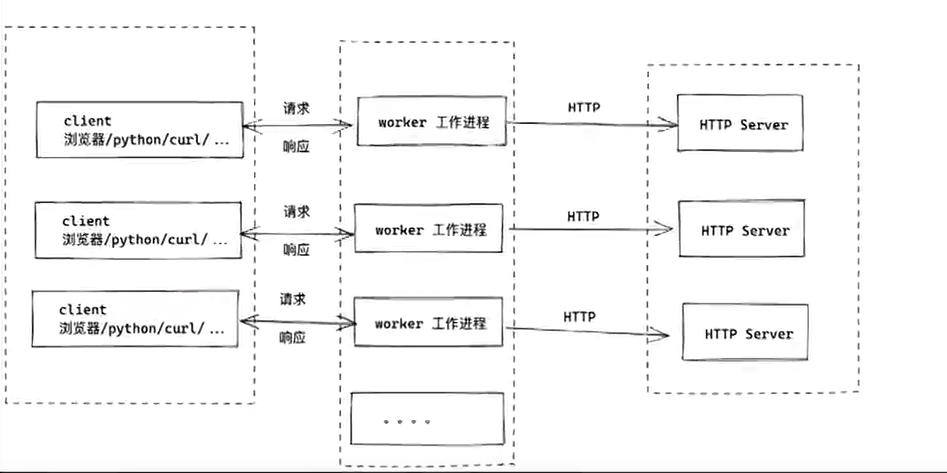
- 实际处理client请求的是worker进程
- master根据nginx.conf 配置worker的数量
- client请求时,worker之间相互竞争,获胜者和client连接并且处理请求
- 接受client请求后,如果需要代理转发给后端,则后端处理完毕后接收处理结果,在响应给client
- 接受并处理master发来的进程信号,例如启动、停止、 重启、重加载等等
# 2. Nginx 的管理命令
# nginx安装
yum install  nginx -y

# nginx 安装完成的可执行文件的路径
which nginx
/usr/sbin/nginx

# 检测nginx.conf 的语法
nginx -t

# 重新读取nginx.cong
nginx -s reload

# 停止nginx,想到玉kill -15
nginx -s  stop

# 启动,多次执行会报错
nginx

# 通过yum命令安装推荐使用systemctl管理

# nginx -s reload 会给master进程发信号,重新读取nginx.conf配置信息,重新生成worker进程,因此worker进程的pid会发生变化
# 但是master进程的id不会变化
1
2
3
4
5
6
7
8
9
10
11
12
13
14
15
16
17
18
19
20
21
22
23
2
3
4
5
6
7
8
9
10
11
12
13
14
15
16
17
18
19
20
21
22
23
启动存在的坑 用什么命令启动的,就需要使用什么工具去管理
# 使用nginx命令启动nginx
[root@iZ2ze58f53sxjm9z7mgn5xZ ~]# nginx
# 查看启动状态
[root@iZ2ze58f53sxjm9z7mgn5xZ ~]# ps -aux | grep nginx
root      905155  0.0  0.0 121288  2184 ?        Ss   15:32   0:00 nginx: master process nginx
nginx     905156  0.0  0.2 151824  8208 ?        S    15:32   0:00 nginx: worker process
nginx     905157  0.0  0.2 151824  8212 ?        S    15:32   0:00 nginx: worker process
root      905436  0.0  0.0   9208  1112 pts/0    S+   15:32   0:00 grep --color=auto nginx

# 使用nginx启动的,但是使用systemctl管理,之后会导致命令报错
[root@iZ2ze58f53sxjm9z7mgn5xZ ~]# systemctl status nginx
● nginx.service - The nginx HTTP and reverse proxy server
   Loaded: loaded (/usr/lib/systemd/system/nginx.service; disabled; vendor preset: disabled)
   Active: failed (Result: exit-code) since Wed 2022-09-21 17:20:16 CST; 1 day 22h ago

Sep 21 17:20:16 iZ2ze58f53sxjm9z7mgn5xZ systemd[1]: Starting The nginx HTTP and reverse proxy server...
Sep 21 17:20:16 iZ2ze58f53sxjm9z7mgn5xZ systemd[1]: nginx.service: Control process exited, code=exited status=203
Sep 21 17:20:16 iZ2ze58f53sxjm9z7mgn5xZ systemd[1]: nginx.service: Failed with result 'exit-code'.
Sep 21 17:20:16 iZ2ze58f53sxjm9z7mgn5xZ systemd[1]: Failed to start The nginx HTTP and reverse proxy server.

# 报错
[root@iZ2ze58f53sxjm9z7mgn5xZ ~]# systemctl restart nginx
Job for nginx.service failed because the control process exited with error code.
See "systemctl status nginx.service" and "journalctl -xe" for details.

# 重新加载也报错
[root@iZ2ze58f53sxjm9z7mgn5xZ ~]# nginx -s reload
nginx: [error] open() "/run/nginx.pid" failed (2: No such file or directory)

# 停止也会报错
[root@iZ2ze58f53sxjm9z7mgn5xZ ~]# nginx -s stop
nginx: [error] open() "/run/nginx.pid" failed (2: No such file or directory)

# 查看对应的进程文件nginx.pid文件不存在,这是因为不是使用systemctl启动的,但是使用systemctl去管理导致的错误
[root@iZ2ze58f53sxjm9z7mgn5xZ ~]# cat /run/nginx.pid
cat: /run/nginx.pid: No such file or directory

# 解决, 查询出nginx的master进程pid
[root@iZ2ze58f53sxjm9z7mgn5xZ ~]# ps -aux | grep nginx | grep master
root      905155  0.0  0.0 121288  2184 ?        Ss   15:32   0:00 nginx: master process nginx

# 将进程pid写入进程管理文件,之后就可以正常停止nginx
[root@iZ2ze58f53sxjm9z7mgn5xZ ~]# echo 905155 > /run/nginx.pid
[root@iZ2ze58f53sxjm9z7mgn5xZ ~]# nginx -s stop
[root@iZ2ze58f53sxjm9z7mgn5xZ ~]# ps -aux | grep nginx
root      921991  0.0  0.0   9208  1072 pts/0    S+   15:40   0:00 grep --color=auto nginx

# 使用systemctl管理nginx
[root@iZ2ze58f53sxjm9z7mgn5xZ ~]# systemctl start nginx
# 查看状态正常运行
[root@iZ2ze58f53sxjm9z7mgn5xZ ~]# systemctl status nginx
● nginx.service - The nginx HTTP and reverse proxy server
   Loaded: loaded (/usr/lib/systemd/system/nginx.service; disabled; vendor preset: disabled)
   Active: active (running) since Fri 2022-09-23 15:40:36 CST; 6s ago
  Process: 922707 ExecStart=/usr/sbin/nginx (code=exited, status=0/SUCCESS)
  Process: 922705 ExecStartPre=/usr/sbin/nginx -t (code=exited, status=0/SUCCESS)
  Process: 922703 ExecStartPre=/usr/bin/rm -f /run/nginx.pid (code=exited, status=0/SUCCESS)
 Main PID: 922708 (nginx)
    Tasks: 3 (limit: 22997)
   Memory: 4.9M
   CGroup: /system.slice/nginx.service
           ├─922708 nginx: master process /usr/sbin/nginx
           ├─922709 nginx: worker process
           └─922710 nginx: worker process

Sep 23 15:40:36 iZ2ze58f53sxjm9z7mgn5xZ systemd[1]: Starting The nginx HTTP and reverse proxy server...
Sep 23 15:40:36 iZ2ze58f53sxjm9z7mgn5xZ nginx[922705]: nginx: the configuration file /etc/nginx/nginx.conf syntax is ok
Sep 23 15:40:36 iZ2ze58f53sxjm9z7mgn5xZ nginx[922705]: nginx: configuration file /etc/nginx/nginx.conf test is successful
Sep 23 15:40:36 iZ2ze58f53sxjm9z7mgn5xZ systemd[1]: Started The nginx HTTP and reverse proxy server.
1
2
3
4
5
6
7
8
9
10
11
12
13
14
15
16
17
18
19
20
21
22
23
24
25
26
27
28
29
30
31
32
33
34
35
36
37
38
39
40
41
42
43
44
45
46
47
48
49
50
51
52
53
54
55
56
57
58
59
60
61
62
63
64
65
66
67
68
69
2
3
4
5
6
7
8
9
10
11
12
13
14
15
16
17
18
19
20
21
22
23
24
25
26
27
28
29
30
31
32
33
34
35
36
37
38
39
40
41
42
43
44
45
46
47
48
49
50
51
52
53
54
55
56
57
58
59
60
61
62
63
64
65
66
67
68
69
# 3. Nginx 配置解读
# 核心模块,nginx的全局配置

# 设置nginx的运行用户
user nginx;

# worker的数量
worker_processes auto;

# 日志的参数设置,在全局参数中设置日志参数,后续所有的虚拟机都会生效
error_log /var/log/nginx/error.log;
pid /run/nginx.pid;

# 使用include导入外部配置文件
include /usr/share/nginx/modules/*.conf;

# nginx的性能设置,tcp的连接数等等
events {
    worker_connections 1024;
}

# nginx的核心网站部署功能
http {
    .....
    # nginx中关于请求与响应的参数,缓存,压缩,长链接超时等等
    sendfile            on;
    tcp_nopush          on;
    tcp_nodelay         on;
    keepalive_timeout   65;
    types_hash_max_size 2048;

    # nginx实现网站部署的虚拟主机设置,一个server代表一个网站站点
    server {

    }
}
1
2
3
4
5
6
7
8
9
10
11
12
13
14
15
16
17
18
19
20
21
22
23
24
25
26
27
28
29
30
31
32
33
34
35
2
3
4
5
6
7
8
9
10
11
12
13
14
15
16
17
18
19
20
21
22
23
24
25
26
27
28
29
30
31
32
33
34
35